Automatic Highlight Video
MediaCopilot’s Automatic Highlight Video Tool makes transforming long videos into engaging highlight reels effortless. Powered by advanced AI, it automatically detects key moments, emotions, and visual cues to create short, impactful clips in seconds—without manual editing. It helps teams repurpose content, boost engagement, and accelerate production across platforms.
MediaCopilot: Your Automatic Highlight Video Tool
MediaCopilot’s Automatic Highlight Video Tool uses advanced AI to identify and extract the most engaging moments from your videos automatically. It detects key scenes, emotions, and visual cues to generate highlight reels and short clips in seconds, saving hours of manual editing.
Built on Cires21’s broadcast technology, it’s ideal for marketing, media, and streaming teams that need to repurpose long-form content quickly. The tool accelerates production, reduces costs, and creates platform-ready highlights that boost engagement and reach across social media and digital channels.


Key Capabilities
Everything you need to automatically detect key moments and create compelling highlight reels from any footage.
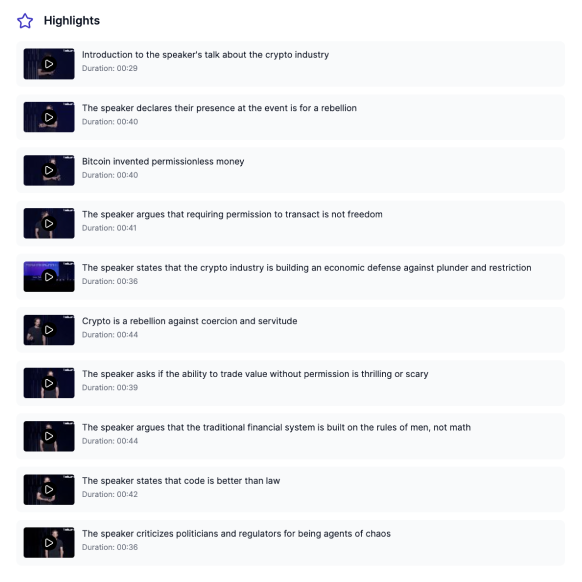
MediaCopilot’s Automatic Highlight Video Tool uses advanced AI to detect the most dynamic scenes, emotions, and visual cues, identifying the moments that truly matter.
Automatically extract key clips from long videos, turning hours of footage into short, impactful highlight reels ready for publishing.
AI models analyze gestures, expressions, and movement to capture the most engaging, emotionally resonant parts of your content.
Define the parameters that guide AI selection—such as duration, speaker, topic, or visual intensity—to match your goals and storytelling style.
Let MediaCopilot stitch selected clips together into cohesive highlight videos automatically, reducing manual post-production time.
Generate highlight formats adapted for YouTube, TikTok, Instagram, LinkedIn, or broadcast, ensuring perfect fit and resolution for each channel.
Export your highlight videos directly to connected platforms or media libraries, streamlining distribution and collaboration across teams.
How It Works
Get started in minutes. Upload your footage, let AI identify the highlights, and export platform-ready clips.
Import video or audio files directly from your device or connect your cloud media library.
MediaCopilot's models analyze, transcribe, and enrich your content in minutes—no manual work.
Inspect AI outputs, adjust labels, speaker names, or timecodes with an intuitive interface.
Download ready-to-use files or publish directly to your platforms with one click.
Why Teams Choose MediaCopilot
Automatic Highlight Video: Who Is It For?
From live sports to corporate comms, AI-powered highlights help every team publish faster and engage more audiences.
Ideal for teams that need a steady flow of impactful content. Turn campaigns, webinars, and product launches into highlight clips ready for social media—boosting visibility and saving hours of manual editing.
Convert long internal communications, events, and onboarding sessions into short, engaging videos. Improve employee engagement while reducing production time and effort.
Automatically create concise learning clips from long courses and training videos. Deliver microlearning content that's easier to absorb, share, and update.
Segment corporate communications, briefings, or reports into easily shareable clips. Ensure that messages are clear, secure, and consistent across all departments and markets.
Generate ready-to-publish clips optimized for TikTok, Instagram, LinkedIn, or YouTube. Maintain an active posting schedule with high-quality video content produced in minutes.
Sports & Entertainment: Instantly create highlight reels from games, concerts, or shows to engage fans and audiences in real time.
Healthcare & Pharma: Turn conferences, training sessions, or educational videos into concise summaries for internal and external use.
Technology & SaaS: Showcase product demos, feature updates, and user tutorials through short, impactful highlight videos.
Manufacturing & Logistics: Capture critical moments from training or operational videos to enhance safety, efficiency, and compliance.
All MediaCopilot Tools
Frequently Asked Questions
MediaCopilot Blog
Stay ahead with our latest insights, news and releases.