Video Clipping Tool
Looking for a Video Clipping Tool that makes editing effortless? MediaCopilot turns hours of footage into scroll-stopping, platform-ready clips with AI-powered automation. Save time, cut costs, and create high-impact content that grows your brand—all in just a few clicks.
MediaCopilot: Your Video Clip Tool
MediaCopilot's Video Clipping tool turns hours of footage into highlight clips ready for social media and campaigns. With advanced AI, it identifies key moments, adds captions, and adapts the format for each platform. This way, you save time and costs while making every video work harder for your brand.
If endless editing hours, lack of staff, or low content performance are overwhelming you, MediaCopilot is exactly what you've been looking for. Designed for companies and agencies, it boosts the reach and ROI of your videos. More results, less effort—all in a single click.


Key Capabilities
Everything you need to turn long-form footage into platform-ready clips — automatically and at scale.
Identifies the most relevant segments of any video using semantic AI and audio/image analysis.
Turns a single long recording into dozens of short pieces ready for social media or campaigns.
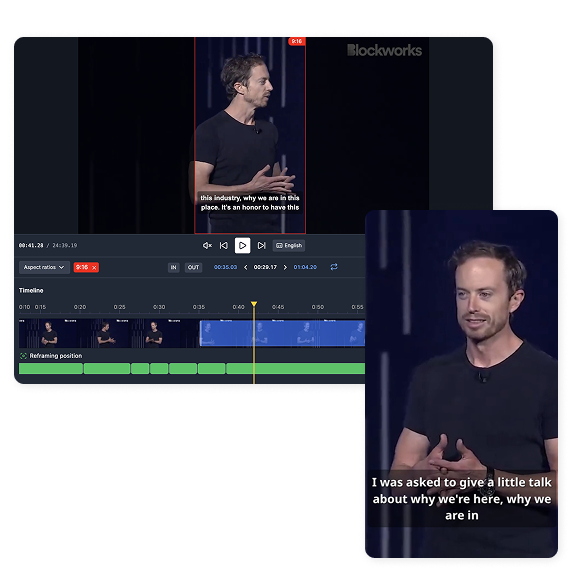
Adapts the format (vertical, square, horizontal) to fit each platform: TikTok, Instagram, YouTube, LinkedIn, etc.
Generates accurate subtitles and multi-language versions in seconds.
Divides content into themed sections for easier reuse.
Minimizes manual work with automated selection, cutting, and exporting processes.
Classifies and tags clips with metadata for quick searches in content libraries.
Exports directly to social media or content management tools to speed up your workflow.
How It Works
Get started in minutes. Upload your footage, let AI detect the best moments, and export or publish instantly.
Fill out the form with your details (name, company, email) and access a free trial or choose a plan that fits your volume.
Add videos or audio files from your device, or integrate with your cloud systems.
In seconds, get automatic transcriptions, voiceovers, highlight suggestions, and social-ready clips.
Adjust subtitles, switch languages, edit suggested clips, and adapt formats to match your brand style.
Download your clips or post them directly to YouTube, Instagram, TikTok, or any other platform.
Why Teams Choose MediaCopilot
AI Video Clipping Tool: Who Is It For?
Whether you run a brand, agency, or media team, AI-powered clipping accelerates every workflow.
Perfect for teams looking for constant, viral content. Turn webinars, campaigns, and presentations into social media–optimized clips, boosting reach and cutting editing costs.
Streamline internal training and onboarding with short, engaging videos that improve retention. Save production time and make content more accessible for employees.
Transform long classes and courses into short, dynamic lessons that promote more effective learning. Easily update content without having to redo entire materials.
Speed up team training and corporate communication with segmented clips that are easy to distribute. Provide security and consistency in shared information.
Boost your digital presence with short, frequent content that leverages TikTok, Instagram, LinkedIn, and YouTube algorithms. Increase engagement without overloading teams.
Creative Agencies: Manage multiple accounts and campaigns without duplicating effort.
Events and Conferences: Publish summaries and highlights instantly.
Retail and eCommerce: Create engaging content to promote products across multiple channels.
Corporate Education: Turn internal sessions into clip libraries for quick reference.
Consulting and Services: Strengthen authority marketing with impactful snippets from webinars and talks.
All MediaCopilot Tools
Frequently Asked Questions
MediaCopilot Blog
Stay ahead with our latest insights, news and releases.